OCR
A RocketRide filter node that extracts machine-readable text and tables from images using optical character recognition.
What it does
Turns visual content (scanned documents, screenshots, photos) into structured text for downstream analysis. The node is GPU-capable and registered as a filter in the pipeline.
Four OCR engines are supported via the ai.common.models model-server wrappers: EasyOCR (multi-language, the default), DocTR (document-focused, language-agnostic), Surya (multi-language, 90+ languages), and TrOCR (transformer-based, Microsoft model). The wrappers auto-detect whether to call a remote model server or fall back to local inference. An unknown engine name falls back to EasyOCR silently.
Table extraction uses img2table for OpenCV-based table structure detection, with OCR inference routed through the same model-server adapter (ModelServerOCR). Detected tables are emitted on the table lane as Markdown. Both img2table v1 and v2 plug-in APIs are supported: v2 reorganised the API and replaced the two-step content/to_ocr_dataframe contract with a single of() method returning OCRData; the node detects the installed version at import time via _IMG2TABLE_V2.
Animated GIFs are handled frame by frame: each frame is OCR'd individually and the per-frame texts are joined with newlines before being written to the text lane. OCR reads are serialised with an internal threading lock so concurrent instances share one engine safely.
Example pipelines
Extract and redact document text
webhook → parse → ocr → ner → anonymize_text → response_text
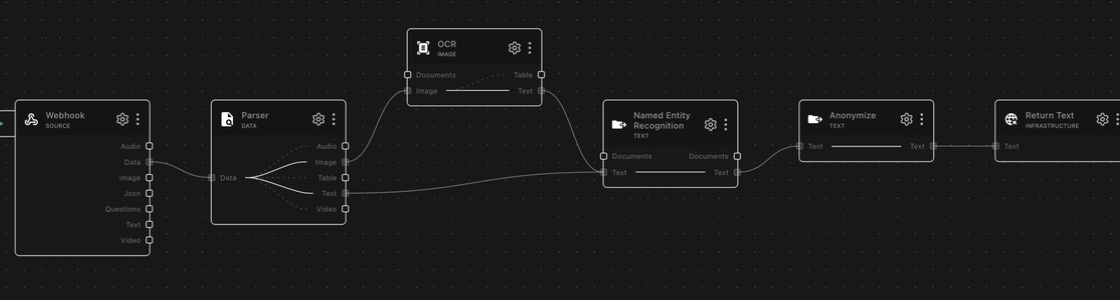

parse feeds document images to OCR and also sends text directly to NER.
Recognized and parsed text is tagged, anonymized, and returned as redacted
text.
Invoice tables into a database
webhook → ocr → extract_data → db_postgres
Invoice images come in and the table lane extracts their line items as
Markdown tables; extract_data structures the fields and PostgreSQL stores
the rows — paper documents to queryable data with no manual entry.
Searchable archive of scanned records
webhook → ocr → embedding_transformer → store_qdrant
OCR converts a scanned archive to text, the embedding node vectorizes it, and the vector store makes it searchable by meaning rather than filename.
Lanes
| Lane in | Lane out | Description |
|---|---|---|
documents | text | Extract text from image documents |
image | text | Extract text from a raw image |
image | table | Extract tables from a raw image |
On the documents lane, every incoming document must be of type Image (the node raises a ValueError otherwise). Each image document is OCR'd and re-emitted as a Document-type copy whose page_content is the extracted text. The original image documents are not forwarded: if a downstream node needs the images themselves, connect it to the source node directly.
Profiles
Profiles are preconfigured combinations of engine, script family, and table engine. Selecting a profile sets all three at once. Default: Latin (English)
(latin).
| Profile key | Title | Engine | Script family | Table engine |
|---|---|---|---|---|
latin (default) | Latin (English) | EasyOCR | latin | DocTR |
latin-extended | Latin Extended (European) | EasyOCR | latin-extended | DocTR |
cyrillic | Cyrillic (Russian, etc.) | EasyOCR | cyrillic | DocTR |
arabic | Arabic/Persian/Urdu | EasyOCR | arabic | DocTR |
devanagari | Devanagari (Hindi, etc.) | EasyOCR | devanagari | DocTR |
chinese-simplified | Chinese (Simplified) | EasyOCR | chinese-simplified | DocTR |
chinese-traditional | Chinese (Traditional) | EasyOCR | chinese-traditional | DocTR |
japanese | Japanese | EasyOCR | japanese | DocTR |
korean | Korean | EasyOCR | korean | DocTR |
doctr | DocTR (Language-agnostic) | DocTR | latin (unused) | DocTR |
surya | Surya (Multi-language) | Surya | latin (unused) | Surya |
trocr | TrOCR (Transformer) | TrOCR | latin (unused) | DocTR |
Configuration
Pick a profile and you can usually ignore everything else — the remaining
fields exist to override what the profile chose. The main settings panel
exposes ocr.profile, ocr.engine, ocr.script_family, and
ocr.table_engine; the DocTR architecture fields are for table extraction
tuning.
OCR Engine
Overrides the engine the profile selected. The trade-offs: EasyOCR covers
the most languages via script families and is the safe default. DocTR is
language-agnostic and strongest on structured documents (forms, dense
layouts). Surya handles 90+ languages without a script-family choice.
TrOCR is transformer-based and best on difficult, handwriting-like text.
An unknown engine name silently falls back to EasyOCR. The TrOCR engine
additionally reads an optional trocr_model config value selecting the
Hugging Face model variant (default: microsoft/trocr-base-printed).
Script Family
Script families map to EasyOCR language code lists — this field picks which set of language models EasyOCR loads. It applies only when the engine is EasyOCR; DocTR, Surya, and TrOCR ignore it. A wrong script family is the most common cause of garbage output on non-English documents: if Russian scans come out as Latin gibberish, check this field first.
Every family except plain latin also loads English as a fallback:
| Family | Languages loaded |
|---|---|
latin | en only (English only, for reliability) |
latin-extended | en plus ~28 Latin-script languages: fr, de, es, it, pt, nl, pl, ro, cs, sk, hu, hr, sl, sq, lt, lv, da, no, sv, id, ms, tl, vi, tr, az, uz, sw, la, oc |
cyrillic | ru, uk, be, bg, rs_cyrillic, mn, en (Macedonian not supported by EasyOCR; Serbian maps to rs_cyrillic) |
arabic | ar, fa, ur, ug, en |
devanagari | hi, mr, ne, en |
bengali | bn, as, en |
chinese-simplified | ch_sim, en |
chinese-traditional | ch_tra, en |
japanese | ja, en |
korean | ko, en |
thai | th, en |
tamil | ta, en |
telugu | te, en |
The bengali, thai, tamil, and telugu families are selectable via ocr.script_family but have no preconfigured profile. The Japanese EasyOCR models may misread English text; the full test suite uses a relaxed assertion (contains: "quick" instead of "quick brown fox") for that profile.
Detection / Recognition Architecture (DocTR)
Model choices for DocTR's two-stage table pipeline: detection finds where text
is, recognition reads it. The defaults (db_resnet50 + crnn_vgg16_bn) are
right for nearly everyone; alternatives trade accuracy against speed and
memory — see the DocTR model docs
before changing them.
Detection architectures: linknet_resnet18, linknet_resnet34, linknet_resnet50, db_resnet50, db_mobilenet_v3_large, fast_tiny, fast_small, fast_base.
Recognition architectures: crnn_vgg16_bn, crnn_mobilenet_v3_small, crnn_mobilenet_v3_large, sar_resnet31, master, vitstr_small, vitstr_base, parseq.
Table OCR Engine
Engine used for table text extraction (default DocTR, which is optimized for
document tables; EasyOCR and Surya are general-purpose alternatives). This is
independent of the main engine field — text and tables can use different
engines.
Requirements
GPU-capable: engines run on CUDA when available and fall back to CPU (slower,
same results). Engine models are fetched through the ai.common.models
model-server wrappers, which auto-detect whether to call a remote model
server or run local inference; models download on first use.
Notes
OpenCV compatibility
All four engines share the cv2 namespace but require different OpenCV builds. The node installs a single unified build, opencv-contrib-python==4.13.0.92, via ai.common.opencv, which also uninstalls competing variants (opencv-python, opencv-python-headless, opencv-contrib-python-headless) so only one cv2 is active at runtime.
Upstream pins (as of the versions currently used):
| Engine | PyPI package | Upstream OpenCV requirement | Matches project's 4.13.0.92? |
|---|---|---|---|
| EasyOCR | easyocr 1.7.2 | opencv-python-headless (unpinned) | Yes |
| DocTR | python-doctr 1.0.1 | opencv-python <5.0.0, >=4.5.0 | Yes |
| Surya | surya-ocr 0.17.1 | opencv-python-headless==4.11.0.86 | No (hard pin to 4.11.0.86) |
| TrOCR | craft-text-detector 0.4.3 (detector dep) | opencv-python <4.5.4.62, >=3.4.8.29 | No (caps below 4.5.4.62) |
Surya and TrOCR's detector pin OpenCV to versions the project deliberately overrides. They work because ai.common.opencv runs depends() at import time and force-aligns all four OpenCV variants to 4.13.0.92 after the engines are installed. Always import from ai.common.opencv import cv2 before importing an OCR engine, or the wrong cv2 may be resolved.
For the same reason, IGlobal.py imports ai.common.opencv before img2table: img2table internally imports cv2 at load time, so the correct OpenCV package must already be active.
img2table version compatibility
img2table 2.0 (released 2026-05-10) reorganised the OCR plug-in API. The node supports both v1 and v2:
| Symbol / location | img2table v1 | img2table v2 |
|---|---|---|
OCRInstance base class | img2table.ocr.base | img2table.ocr._types |
Result type returned by of() | OCRDataframe (img2table.ocr.data) | OCRData (img2table.ocr._types) |
| Plug-in contract | content() + to_ocr_dataframe() | single of() override |
The _IMG2TABLE_V2 flag is set at import time and gates each code path. external_contracts.py declares version-tagged import requirements so the check-externals CI framework can validate the correct symbols on whichever version is installed.
Upstream docs
Schema
| Field | Type | Description | Default |
|---|---|---|---|
ocr.det_arch | string | Detection Architecture (DocTR) Choose the architecture used for table text detection. Documentation: https://mindee.github.io/doctr/latest/using_doctr/using_models.html | "db_resnet50" |
ocr.engine | string | OCR Engine Select the OCR engine for text extraction. EasyOCR supports many languages with script families. DocTR is language-agnostic and good for documents. Surya supports multi-language. TrOCR uses transformer models. | "easyocr" |
ocr.profile | string | OCR Profile Select a preconfigured OCR profile optimized for different languages and use cases. | "latin" |
ocr.reco_arch | string | Recognition Architecture (DocTR) Choose the architecture used for table text recognition. Documentation: https://mindee.github.io/doctr/latest/using_doctr/using_models.html | "crnn_vgg16_bn" |
ocr.script_family | string | Script Family Select the script family for OCR. This determines which languages are loaded for text recognition. Only applies to EasyOCR engine. | "latin" |
ocr.table_engine | string | Table OCR Engine Select the OCR engine used for table text extraction. DocTR is optimized for document tables. EasyOCR and Surya are general-purpose alternatives. | "doctr" |
Dependencies
img2tablepillownumpy