GitHub
A RocketRide tool node that exposes GitHub repository operations to an AI agent.
About GitHub
GitHub is the world's largest code-hosting platform, built on git. Teams use it for source control, code review, issue tracking, releases, and CI/CD automation via GitHub Actions.
What it does
Gives an agent full access to the GitHub REST API: files, issues, pull requests, reviews, releases, workflows, organizations, users, search, and commit history. Useful for agents that manage codebases, triage issues, automate releases, or operate CI/CD pipelines.
Uses the requests library to call the GitHub REST API v3 (https://api.github.com,
API version 2022-11-28) with Bearer-token auth and a 30-second request timeout. API
responses are stripped of noisy fields (node_id, _links, gravatar data, etc.) so the
agent gets compact, useful output.
A personal access token is required: the pipeline fails to start without one. Write operations are allowed by default; enable read-only mode to block every mutating tool when the agent should only inspect.
Example pipelines
GitHub assistant
chat → agent_rocketride → response_answers
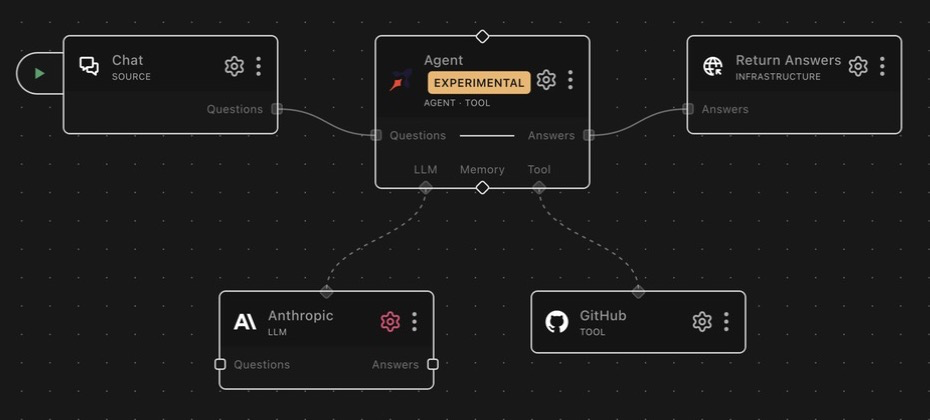

llm_anthropic is wired to llm and tool_github to tool. Chat questions
reach the agent, which can inspect or update the configured repository before
returning an answer.
Read-only codebase analyst
An agent with this node as a tool and read-only mode on: it can search code, read files, and summarize pull requests, with every mutating call blocked at dispatch — safe to point at production repositories.
Release automation
webhook → agent_deepagent → response, with this node plus tool_python as
tools. The agent drafts release notes from commit_list, creates the release
with release_create, and dispatches the publish workflow with
workflow_dispatch.
As a tool
List tools accept per_page (1–100, default 30) and page (default 1) for pagination.
Most tools accept an optional repo parameter (owner/repo). If omitted, the configured
defaultRepo is used; if neither is set, the call fails with an error asking for a repo.
Files
| Tool | Description |
|---|---|
file_get | Get the decoded content and metadata of a single file |
file_list | List files and directories at a path |
file_create | Create a new file |
file_edit | Update an existing file. Requires the current file SHA (get it from file_get first) |
file_delete | Delete a file. Requires the current file SHA (get it from file_get first) |
file_get raises an error when the path is a directory (use file_list), and
file_list raises when the path is a file (use file_get). Reads accept an optional
ref (branch, tag, or commit SHA); writes accept an optional branch and commit
message.
Issues
| Tool | Description |
|---|---|
issue_get | Get a single issue by number |
issue_list | List issues (filter by state, labels, assignee) |
issue_create | Create a new issue (title, body, labels, assignees) |
issue_comment | Post a comment on an issue |
issue_edit | Edit an issue (title, body, state, labels, assignees) |
issue_lock | Lock an issue to prevent further comments |
GitHub's issues endpoint includes pull requests; issue_list filters them out, and
issue_get raises an error for PR numbers (use pr_get).
Pull requests
| Tool | Description |
|---|---|
pr_get | Get a single pull request by number |
pr_list | List pull requests (filter by state, base branch) |
pr_create | Create a pull request (title, head, base, body, draft flag) |
Reviews
| Tool | Description |
|---|---|
review_create | Submit a PR review: APPROVE, REQUEST_CHANGES, or COMMENT |
review_list | List all reviews on a pull request |
review_get | Get a single review |
review_update | Update the body of a pending review |
Repository
| Tool | Description |
|---|---|
repo_get | Repository metadata (stars, forks, language, default branch, etc.) |
Releases
| Tool | Description |
|---|---|
release_list | List releases |
release_get | Get a single release by ID |
release_create | Create a release (tag, title, notes, draft/prerelease) |
release_update | Update an existing release |
release_delete | Delete a release |
Workflows
| Tool | Description |
|---|---|
workflow_list | List workflows in a repository |
workflow_get | Get a single workflow by ID or filename (e.g. ci.yml) |
workflow_dispatch | Trigger a workflow_dispatch event on a branch or tag, with optional inputs |
workflow_enable | Enable a previously disabled workflow |
workflow_disable | Disable a workflow so it will not run |
workflow_get_usage | Billable minutes and run counts for a workflow |
Organization & users
| Tool | Description |
|---|---|
org_list_repos | List repos in an organization (filter by type) |
user_get_repos | List repos for a user, omit username for the authenticated user |
user_invite | Invite a user to an organization by email (role: admin · direct_member · billing_manager) |
Search & commits
| Tool | Description |
|---|---|
search_code | Search code, supports GitHub code search syntax (e.g. mcp_client transport extension:py) |
search_issues | Search issues and PRs, supports GitHub issue search syntax, optional state filter |
commit_list | List commits, optionally filtered to a file path or starting ref |
commit_get | Get a single commit with diff stats and per-file patches |
Configuration
Three fields: the token (see Authentication), a default repository, and a read-only switch. The two behavioral ones are detailed below.
Default Repository
Fallback repo in owner/repo format used when a tool call omits its repo
parameter. Note that search_code and search_issues also fall back to it:
when a default repo is configured, searches are scoped to that repository
unless the call passes its own repo. To search across all accessible
repositories, leave this field blank.
Read-only mode
When readOnly is true, every mutating tool is blocked at dispatch and returns an
error. This is the recommended setting when the agent only needs to inspect repositories.
Blocked tools: file_create, file_edit, file_delete, issue_create,
issue_comment, issue_edit, issue_lock, pr_create, review_create,
review_update, release_create, release_update, release_delete,
workflow_dispatch, workflow_enable, workflow_disable, user_invite.
Always allowed: file_get, file_list, issue_get, issue_list, pr_get, pr_list,
review_list, review_get, repo_get, release_list, release_get, workflow_list,
workflow_get, workflow_get_usage, org_list_repos, user_get_repos, search_code,
search_issues, commit_list, commit_get.
Note the default is false, a freshly added node can write. Turn read-only mode on
explicitly for inspect-only agents.
Authentication
Set token to a GitHub Personal Access Token. Classic tokens need the repo, issues,
pull_requests, and workflows scopes; a fine-grained token scoped to only the
repositories the agent needs is the safer choice. The token is sent as a
Authorization: Bearer header on every request; there is no unauthenticated mode.
API errors are surfaced to the agent as readable messages including the HTTP status and GitHub's error details.
Notes
Running the tests
# Integration tests against a real repository (skipped unless both vars are set)
export GITHUB_TOKEN=<your token>
export GITHUB_TEST_REPO=owner/repo
pytest nodes/test/tool_github/test_tools.py -v
Upstream docs
Schema
| Field | Type | Description | Default |
|---|---|---|---|
github.defaultRepo | string | Default Repository Default repo in owner/repo format (e.g. acme/myapp). Tool calls that omit the repo parameter will use this value. | "" |
github.readOnly | boolean | Read-only mode When enabled, all write operations (file create/edit/delete, issue create, PR create, etc.) are blocked. Safe for agents that should only read. | false |
github.token | string | Personal Access Token GitHub PAT with repo, issues, pull_requests, and workflows scopes. Use a fine-grained token scoped to only the repos you need. | "" |
Dependencies
requests>=2.34.2tenacity