PostgreSQL
A RocketRide database node that answers natural-language questions against a PostgreSQL database and inserts structured pipeline data into tables.
What it does
Plays two roles in a pipeline. As a pipeline node, it receives natural-language questions on the questions lane, asks a connected LLM to translate them into SQL, executes the query, and emits the results; it also accepts structured data on the answers lane and inserts it into the configured table. As a tool node, agents call it directly through three functions: get_data, get_schema, and get_sql.
Uses SQLAlchemy with the psycopg2 driver (psycopg2-binary). The connection string is built as postgresql+psycopg2://user:password@host/database; user, password, and database are URL-encoded so reserved characters (@, /, #, :) are safe, and the host may carry an explicit port (e.g. localhost:5433).
Safety defaults: only SELECT statements are permitted for queries (whitelist check, see Notes), generated SQL is validated with EXPLAIN against the live database before execution, and raw SQL execution (QuestionType.EXECUTE) is disabled by default via allow_execute.
The same implementation also ships as a Supabase preset (services.supabase.json, protocol db_supabase://): Supabase is managed Postgres, so it is a branded configuration, not separate code.
Example pipelines
Chat with your database
chat → db_postgres → response_answers + response_table
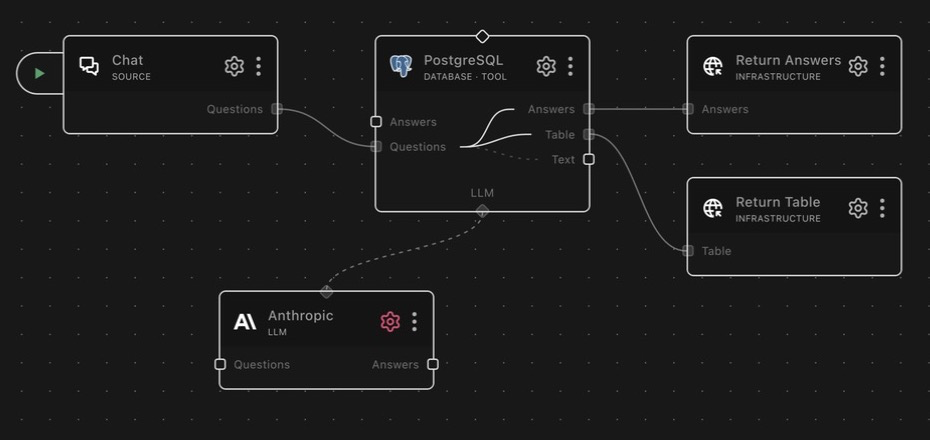

llm_anthropic is wired to llm. Natural-language questions arrive from
chat; PostgreSQL returns conversational answers and tabular results on the
two response lanes.
Structured extraction into a table
webhook → ocr → extract_data → db_postgres
Scanned documents are OCR'd, extract_data structures the fields, and the
rows arrive on this node's answers lane — the table is auto-created on
first insert.
Agent with database access
An agent (e.g. agent_deepagent) with this node connected as a tool. The
agent calls get_schema to learn the shape of the data, then get_data to
answer questions — with the SELECT-only whitelist keeping it read-safe.
Connections
| Connection | Required | Description |
|---|---|---|
llm | yes | LLM used to generate SQL from natural language |
Lanes
| Lane in | Lane out | Description |
|---|---|---|
questions | table | Translate question to SQL, execute, return as a markdown table |
questions | text | Translate question to SQL, execute, return as text |
questions | answers | Translate question to SQL, execute, return as answers |
answers | — | Parse structured rows and insert into the table |
If the LLM decides a question is not a database query, its text response is emitted instead of query results.
Two special question types are handled on the questions lane:
QuestionType.DIALECT: emits{"dialect": "postgres"}on theanswerslane so SDK callers can branch on the underlying engine.QuestionType.EXECUTE: runs the question text as raw SQL (read or write, no LLM, no safety check). Gated byallow_execute; when disabled the request is logged and dropped.SELECTresults are capped at 25,000 rows; write statements reportaffected_rows.
As a tool
When connected to an agent, the node exposes three functions. The registered tool names are the bare method names below; the services.json prefix is a URL/path prefix and never appears in a tool name. An agent catalog namespaces each tool by the pipeline component id (for example <component-id>.get_data).
| Tool | Description |
|---|---|
get_data | Natural language to SQL, executes it, returns rows plus the generated SQL (default 250 rows, max 25,000 via limit) |
get_schema | Returns tables, columns, types, primary keys, and foreign keys, for the full database or one table |
get_sql | Natural language to SQL only, no execution |
get_data and get_sql return valid: false with an error (unsafe SQL) or an answer (the question was not a database query) when no executable query is produced.
Transactions
Three additional tool functions support explicit database transactions. All three require allow_execute=true on the node (the same gate as QuestionType.EXECUTE); requests are silently dropped when the gate is off.
| Tool | Input | Returns | Description |
|---|---|---|---|
begin | (none) | {"session_id": "<id>"} | Opens a new transaction and reserves a dedicated connection for it. Returns a session_id that callers must thread through subsequent execute, commit, and rollback calls. |
commit | {"session_id": "<id>"} | {"ok": true} | Commits all statements made on the given session, releases the held connection back to the pool, and removes the session entry. |
rollback | {"session_id": "<id>"} | {"ok": true} | Discards all statements made on the given session, releases the held connection, and removes the session entry. |
To run a statement inside an open transaction, pass the session_id returned by begin as the session_id field of an execute tool call. Statements without a session_id run on a fresh auto-commit connection and are not part of any transaction.
Sessions are server-scoped: the session_id is only valid on the node instance that issued it. Idle sessions are reaped automatically after a configurable timeout; the engine also closes all sessions when the pipeline is torn down.
The Python SDK exposes these as client.database.begin_transaction(), client.database.commit(), and client.database.rollback(). The TypeScript SDK exposes them as client.database.beginTransaction(), client.database.commit(), and client.database.rollback().
To run a statement inside an open session from the SDK, pass the session_id (and any positional $1..$n params) to the database query method — Python client.database.query(token=..., sql=..., session_id=..., params=[...]), TypeScript client.database.query({ token, sql, sessionId, params }). Parameters are bound server-side. A query(...) call without a session_id runs on a fresh auto-commit connection and is not part of any transaction.
Configuration
Connection settings (host, user, password, database, table) plus three fields
that shape query behavior, detailed below. The single default profile presets
database to postgres.
Database description
Free-text description of what the database contains and what it is used for,
included in the prompt when the LLM generates SQL. This is the highest-leverage
field on the node: a specific description ("orders and customers for the EU
webshop; orders.status is an enum of pending/shipped/returned") measurably
improves query accuracy, while a blank one leaves the LLM guessing from column
names alone. Update it when the schema's meaning changes, not just its shape.
Max validation attempts
How many times the node re-asks the LLM after EXPLAIN rejects the generated
SQL (default 5). Raise it for complex schemas where first attempts often fail;
lower it to fail fast in latency-sensitive pipelines. Each retry feeds the
database error back to the LLM, so attempts are not blind retries.
Allow direct query execution
Gates raw SQL execution (QuestionType.EXECUTE and the transaction tools).
Off by default — leave it off unless a trusted application explicitly needs to
issue SQL directly, because enabled callers bypass both the LLM translation
and the SELECT-only safety check.
Limitations
Declared noremote: this node runs on the local engine host only and is not
available for remote execution. It needs a direct network path to the
PostgreSQL server it queries.
Notes
SQL safety & validation
Generated SQL passes two gates before execution:
- Whitelist check: only statements beginning with
SELECT(optionally prefixed byEXPLAIN) are allowed; everything else is rejected. Comments are stripped first so comment-based bypasses are neutralised, every statement in a multi-statement input is checked,SELECT ... INTO OUTFILE/DUMPFILEis blocked, andWITH(CTE) is deliberately excluded because PostgreSQL accepts CTE-into-mutation (e.g.WITH x AS (...) DELETE ...). EXPLAINvalidation: the query is validated against the live database. IfEXPLAINrejects it, the rejected SQL and the database error are fed back to the LLM for a corrected query, up tomax_attemptstimes (default 5).
Insert operations never go through SQL generation; they use the answers lane.
Data insertion
Rows arriving on the answers lane are inserted into the configured table:
- The table is auto-created from the shape of the first batch if it does not exist (column types inferred from the data).
- Incoming keys are matched to columns case-insensitively (
UserNamemaps tousername); schema columns missing from the data are inserted asNULL. - Lists and dicts are serialised as JSON strings; booleans are stored as
0/1. - Each batch is inserted in a single transaction: on failure it is rolled back and the error re-raised.
Supabase preset
services.supabase.json registers the same node as Supabase (db_supabase://); its tools carry the same bare names. The connection is encrypted over TLS. Operational notes:
- Use the Supavisor pooler from the Supabase dashboard (Connect button):
aws-0-<region>.pooler.supabase.com:6543(transaction) or:5432(session). It works over IPv4. - The direct connection (
db.<project-ref>.supabase.co:5432) is IPv6-only and will fail to resolve on networks without IPv6. - For the pooler, the user must include your project ref:
postgres.<project-ref>. Without the suffix the pooler returnsno tenant identifier. For the direct connection it is justpostgres. - The database password comes from your Supabase project (Project Settings -> Database); the database name defaults to
postgres.
Schema
PostgreSQL (services.json)
| Field | Type | Description | Default |
|---|---|---|---|
postgresdb.allow_execute | boolean | Allow direct query execution Permit QuestionType.EXECUTE callers to run raw SQL without LLM translation or safety checks. Leave OFF unless a trusted application explicitly needs to issue SQL directly. | false |
postgresdb.database | string | Database name Name of database | "postgres" |
postgresdb.db_description | string | Database description What is this database used for? Describe its content and purpose, this helps the LLM generate more accurate queries. | "" |
postgresdb.host | string | PostgreSQL host Host name or IP address of the PostgreSQL server, optionally including a port (e.g. localhost:5433) | "localhost" |
postgresdb.max_attempts | integer | Max validation attempts Maximum number of times to re-ask the LLM if EXPLAIN rejects the generated SQL | 5 |
postgresdb.password | string | Password Password to connect to the PostgreSQL server | |
postgresdb.profile | string | "default" | |
postgresdb.table | string | Table name Name of table | "table" |
postgresdb.user | string | User User to connect to the PostgreSQL server | "postgres" |
Supabase (services.supabase.json)
| Field | Type | Description | Default |
|---|---|---|---|
postgresdb.allow_execute | boolean | Allow direct query execution Permit QuestionType.EXECUTE callers to run raw SQL without LLM translation or safety checks. Leave OFF unless a trusted application explicitly needs to issue SQL directly. | false |
postgresdb.database | string | Database name Name of database (Supabase default is 'postgres') | "postgres" |
postgresdb.db_description | string | Database description What is this database used for? Describe its content and purpose, this helps the LLM generate more accurate queries. | "" |
postgresdb.host | string | Supabase host From the Supabase dashboard (Connect button), including the port. Recommended: the Supavisor pooler (works over IPv4) -> aws-0- | |
postgresdb.max_attempts | integer | Max validation attempts Maximum number of times to re-ask the LLM if EXPLAIN rejects the generated SQL | 5 |
postgresdb.password | string | Password Database password from your Supabase project (Project Settings -> Database) | |
postgresdb.profile | string | "default" | |
postgresdb.table | string | Table name Name of table | "table" |
postgresdb.user | string | User Database user. For the pooler (recommended) it MUST include your project ref: postgres. | "postgres" |
Dependencies
psycopg2-binary==2.9.12