Introduction

Build, debug, and deploy AI pipelines - without leaving your IDE.


Quick Start
- Install the RocketRide extension from the VS Code Marketplace
- Click the RocketRide icon in the Activity Bar
- Create a
.pipefile - it opens automatically in the visual canvas builder - Wire up nodes by connecting input and output lanes, then hit Play to run
What is RocketRide?
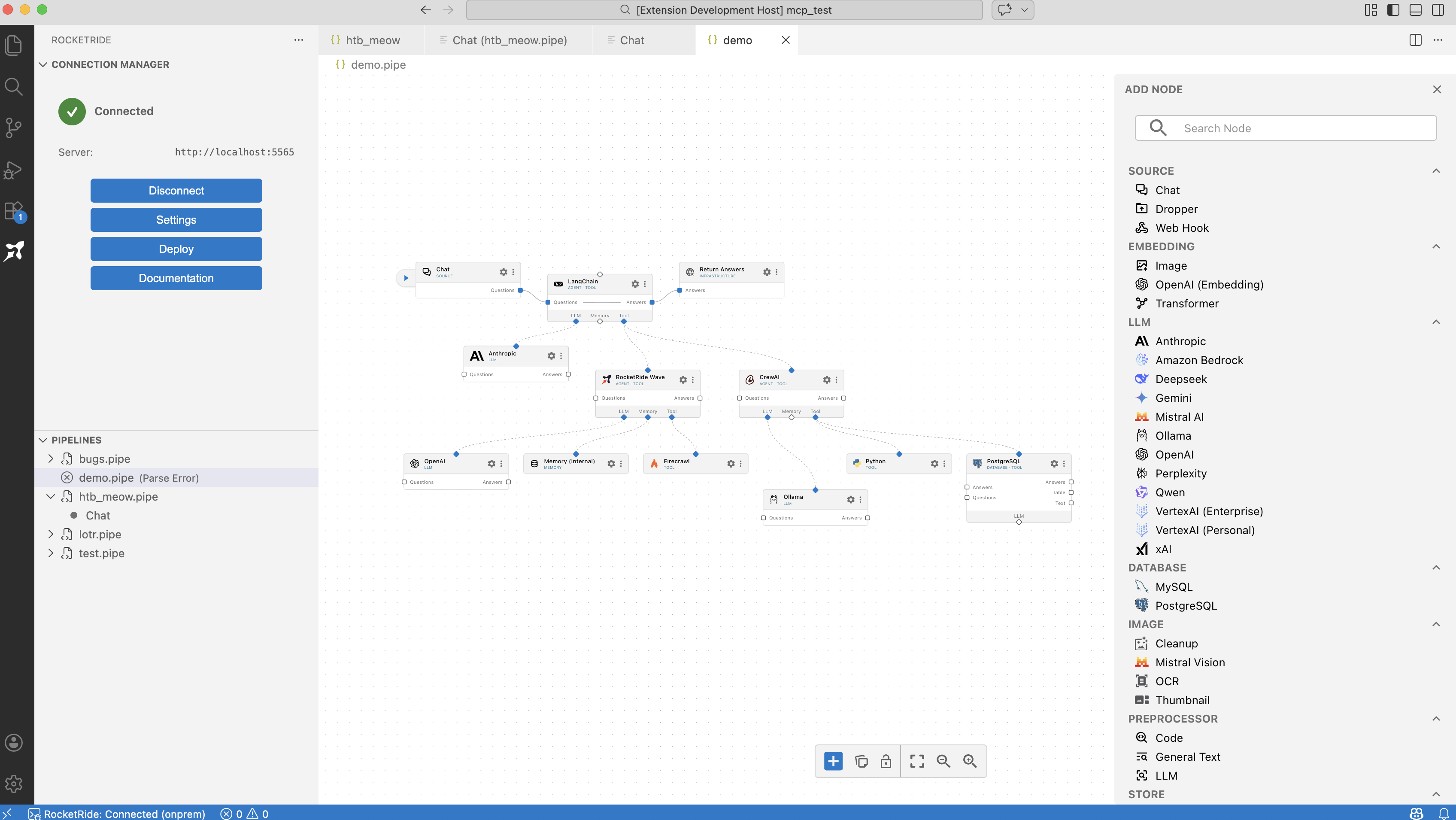
RocketRide is an open-source, developer-native AI pipeline platform. It lets you build, debug, and deploy production AI workflows without leaving your IDE - using a visual drag-and-drop canvas or code-first with TypeScript and Python SDKs.
You build your .pipe - and you run it against the fastest AI runtime available.
- 50+ ready-to-use nodes - 13 LLM providers, 8 vector databases, OCR, NER, PII anonymization, and more
- High-performance C++ engine - production-grade speed and reliability
- Deploy anywhere - locally, on-premises, or self-hosted with Docker
- MIT licensed - fully open-source, OSI-compliant
Features
- Visual canvas builder - Drag, drop, and wire up AI workflows directly in VS Code. Create
.pipefiles to get started. - Debugging & live traces - Monitor running pipelines in real time with execution traces, token usage, and memory stats, see exactly what your agents are doing at every step.
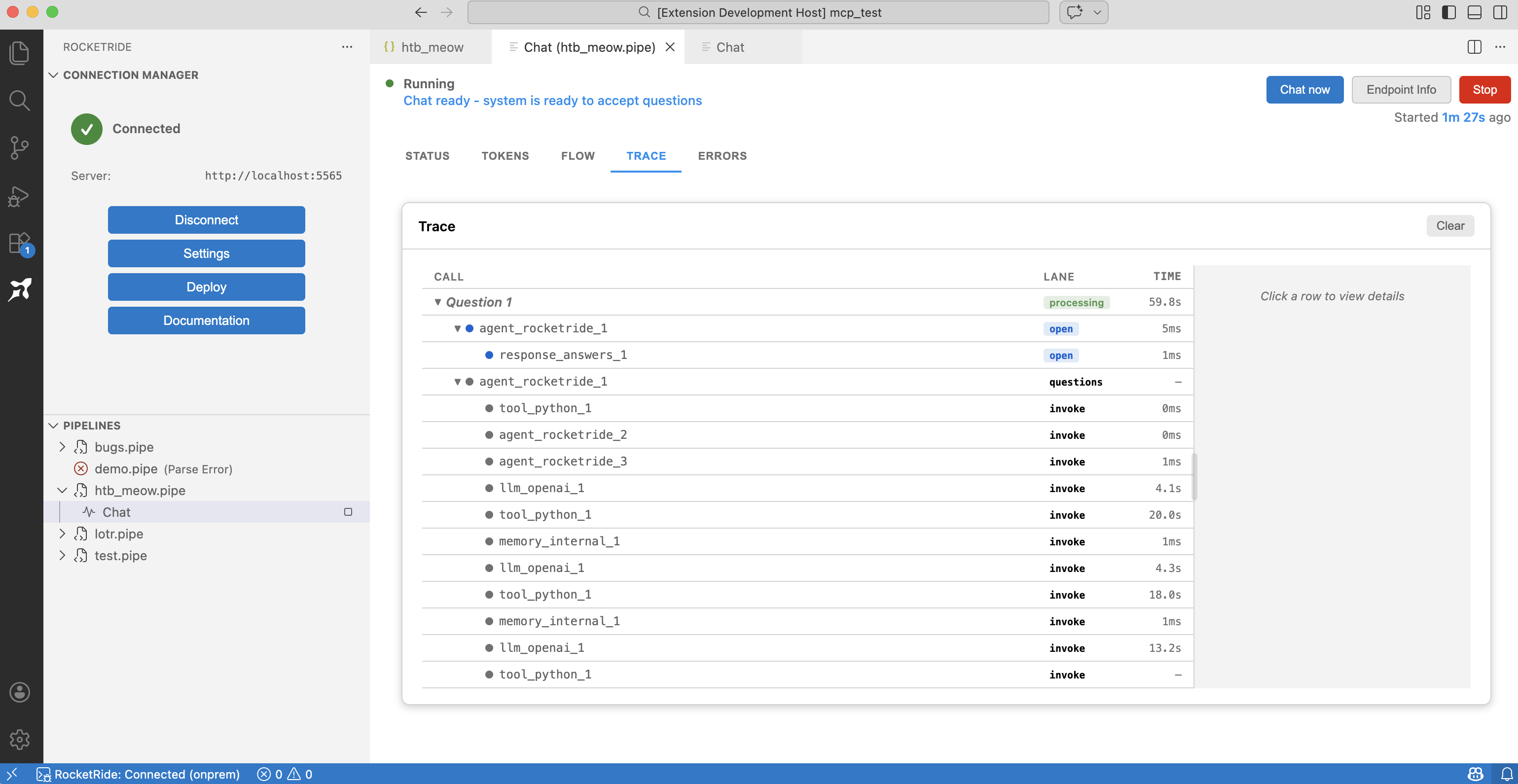
- Connection manager - Connect to a local engine (one click, no setup) or your own on-premises server.
- SDKs for TypeScript, Python & MCP - Embed pipelines in your apps or expose them as tools for AI assistants.
Need inspiration? Check out awesome-rocketride, a collection of example projects built on RocketRide.
Extension Settings
| Setting | Type | Default | Description |
|---|---|---|---|
rocketride.connectionMode | string | "local" | Connection mode: "local" (your machine), "onprem" (your own hosted server), or "cloud" (coming soon) |
rocketride.hostUrl | string | "http://localhost:5565" | Host URL for RocketRide service. Host and port will be parsed from this URL. |
rocketride.defaultPipelinePath | string | "${workspaceFolder}/pipelines" | Default directory path for creating new pipeline files |
rocketride.local.engineVersion | string | "latest" | Engine version to download. "latest" for newest stable, "prerelease" for newest prerelease, or a specific tag like "server-v3.1.1". |
rocketride.engineArgs | string[] | [] | Additional arguments passed to the engine subprocess |
rocketride.pipelineRestartBehavior | string | "prompt" | Behavior when a .pipe file changes while the pipeline is running: "auto", "manual", or "prompt" |
rocketride.integrations.copilot | boolean | false | Enable RocketRide integration with GitHub Copilot |
rocketride.integrations.claudeCode | boolean | false | Enable RocketRide integration with Claude Code |
rocketride.integrations.cursor | boolean | false | Enable RocketRide integration with Cursor |
rocketride.integrations.windsurf | boolean | false | Enable RocketRide integration with Windsurf |
Commands
| Command | Description |
|---|---|
RocketRide: Connect to Server | Connect to the RocketRide engine |
RocketRide: Disconnect from Server | Disconnect from the engine |
RocketRide: Reconnect to Server | Reconnect to the engine |
RocketRide: Open RocketRide Settings | Open extension settings |
RocketRide: Open Status Page | View server and pipeline status |
RocketRide Pipeline: Create New Pipeline | Create a new .pipe file |
RocketRide Pipeline: Run | Run the selected pipeline |
RocketRide Pipeline: Stop Pipeline | Stop a running pipeline |
RocketRide: Open as Text | Open a .pipe file as raw JSON |
RocketRide: Welcome | Open the welcome page |
Links
License
MIT - see LICENSE.